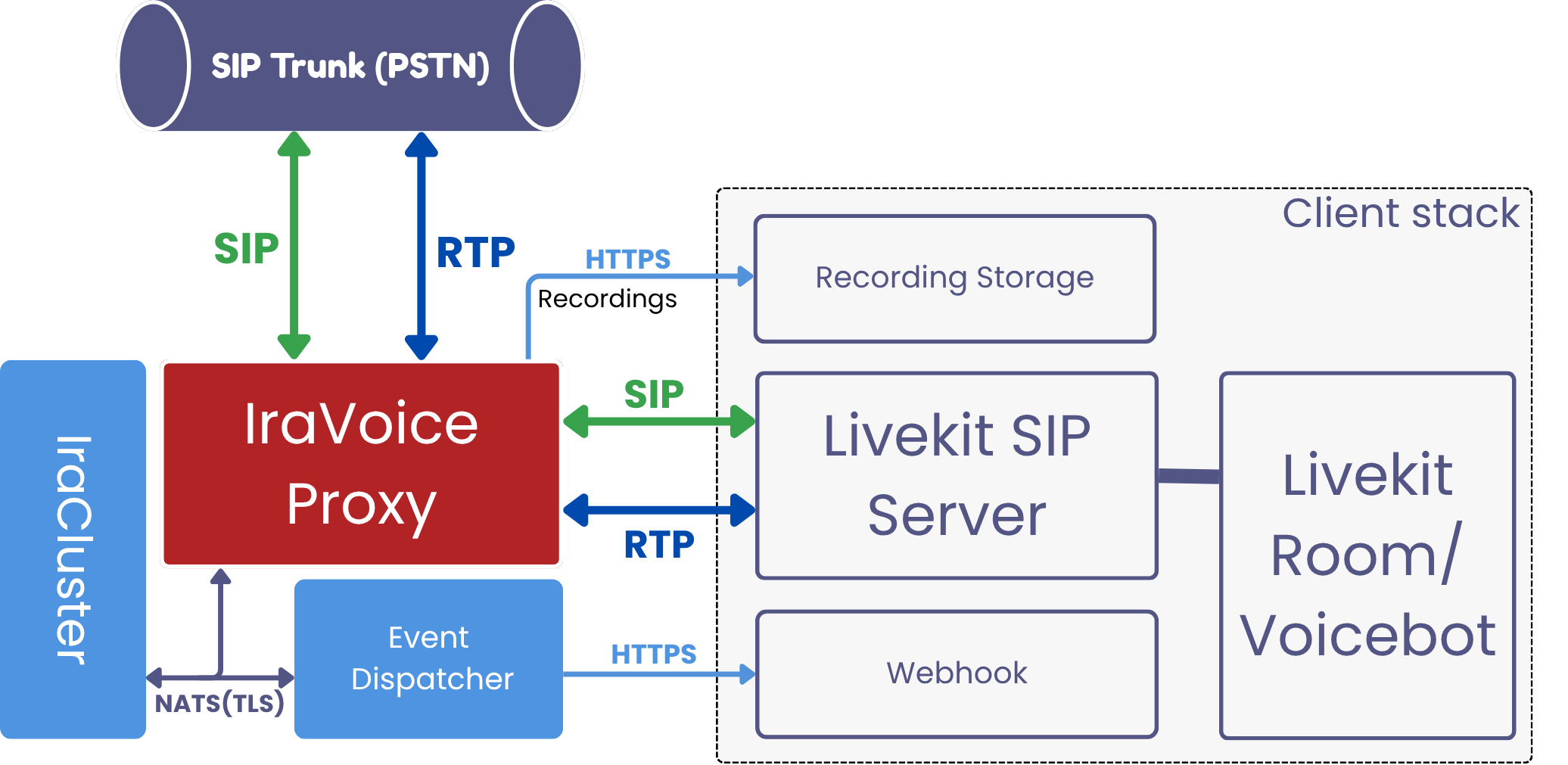
IraVoice enables LiveKit integration by proxying inbound and outbound PSTN calls between LiveKit rooms and telecom networks.
This guide explains how to enable inbound and outbound PSTN calling between LiveKit rooms and the public telephone network using the IraVoice platform and Epicode SIP connectivity.
Architecture Overview
Outbound Call Flow
Inbound Call Flow
SIP Configuration
The following SIP credentials will be provided by the Epicode team and must be used while creating SIP trunks in LiveKit.
Parameter Description SIP Server IP Provided by Epicode SIP Port Provided by Epicode SIP Username Provided by Epicode SIP Password Provided by Epicode Allowed Numbers (DIDs / Caller IDs) Provided by Epicode
Outbound Calling Setup (LiveKit → PSTN)
Step 1: Create an Outbound SIP Trunk
Create an outbound SIP trunk in LiveKit using the SIP credentials provided by Epicode.
Example
{ "trunk" : { "name" : "SL outbound trunk" , "address" : "111.12.128.69:5090" , "numbers" : [ "+918044781234" ], "auth_username" : "1019" , "auth_password" : "pass@123" } }
Step 2: Create a SIP Participant
From your application, create a SIP participant in a LiveKit room with:
Destination phone number
Room name
SIP trunk ID
Custom SIP X-* headers (optional)
Important Notes
Prefix the destination number with 789 (or another mutually agreed prefix) before placing the call.
This prefix is used by the Epicode dialplan to identify and correctly route calls originating from your LiveKit deployment.
Custom SIP X-* headers can be passed and will be forwarded to IraVoice.
Example
{ "sip_number" : "+918044781234" , "sip_trunk_id" : "ST_ebQsvbf9TgC2" , "sip_call_to" : "7896366430222" , "room_name" : "open-room" , "participant_identity" : "sip-test" , "participant_name" : "Test call participant" , "wait_until_answered" : true , "headers" : { "X-Livekit-ID" : "livekit-id" } }
Result
The destination phone user joins the LiveKit room as a participant.
Inbound Calling Setup (PSTN → LiveKit)
LiveKit SIP Endpoint
To enable inbound calling, share your LiveKit SIP endpoint with the Epicode team.
Endpoint Format
{destination_number}@abcdefghijk.sip.livekit.cloud;transport=tcp
Example
+919876543210@kejbcnkesbvb.sip.livekit.cloud;transport=tcp
This endpoint will be configured by Epicode as the SIP destination for inbound calls.
Step 1: Configure an Inbound SIP Trunk
Create an inbound SIP trunk in LiveKit and configure the DID numbers that will receive calls.
Example
{ "trunk" : { "name" : "My trunk" , "numbers" : [ "+919876595372" ], "krisp_enabled" : false } }
Step 2: Create a Dispatch Rule
Create a dispatch rule that routes incoming calls to a specific LiveKit room.
Example
{ "dispatch_rule" : { "rule" : { "dispatchRuleDirect" : { "roomName" : "open-room" } }, "name" : "My dispatch rule" } }
Result
When a user calls the configured DID, the call is automatically connected to the mapped LiveKit room.
Call Recording
Epicode supports multiple recording delivery options through the IraVoice platform:
Push recordings to a customer-provided HTTP endpoint (webhook).
Upload recordings directly to customer-managed cloud storage.
Supported storage platforms include:
Amazon S3
Google Cloud Storage (GCS)
Microsoft Azure Blob Storage
Recording delivery can be configured independently for test and production environments.
Real-Time Call Events
The IraVoice platform can send real-time call lifecycle events to a customer-provided HTTP endpoint (webhook).
Supported events include:
Event Ringing Answered Bridged Unbridged Hangup Call Quality Metrics
Sample Ringing Event
{ "event_name" : "iravoice::ringing" , "event_data" : { "call_uuid" : "cd94574d-e51a-4689-80ad-daf753453ce9" , "other_leg_uuid" : "799c937b-b34d-47fc-8238-1088439a1ad0" , "network_ip" : "10.5.110.117" , "tenant_id" : "xyz" , "call_type" : "proxy" , "to_number" : "+911234567899" , "from_number" : "+911234567890" , "call_params" : { "call_direction" : "outbound" , "event_url" : "http://192.168.1.5:8003/epicode-logs" , "recording_format" : "wav" }, "sip_fields" : { "livekit_id" : "cf6d8581-7128-4dd7-9ce5-8f6871057626" }, "direction" : "outbound" , "timestamp" : "2026-02-18T11:59:43.149058Z" } }
Sample Answered Event
{ "event_name" : "iravoice::answered" , "event_data" : { "tenant_id" : "xyz" , "call_uuid" : "799c937b-b34d-47fc-8238-1088439a1ad0" , "call_params" : { "call_direction" : "outbound" , "event_url" : "http://192.168.1.5:8003/epicode-logs" , "recording_format" : "wav" }, "dialer_ip" : "192.168.11.13" , "gateway" : "" , "call_type" : "proxy" , "direction" : "inbound" , "network_ip" : "127.0.0.1" , "timestamp" : "2026-02-18T11:59:43.160396Z" , "sip_fields" : { "livekit_id" : "cf6d8581-7128-4dd7-9ce5-8f6871057626" } } }
Sample Hangup Event
{ "event_name" : "iravoice::hangup" , "event_data" : { "tenant_id" : "xyz" , "call_uuid" : "62b0ab5e-483d-4e61-8143-ecde97e36d23" , "call_params" : { "call_direction" : "outbound" , "event_url" : "http://192.168.1.5:8003/epicode-logs" , "recording_format" : "wav" }, "dialer_ip" : "192.168.11.13" , "gateway" : "" , "call_type" : "proxy" , "direction" : "inbound" , "network_ip" : "127.0.0.1" , "failure_status" : "480" , "failure_phrase" : "Temporarily not available" , "from_number" : "+917123451234" , "to_number" : "1234567890" , "hangup_cause" : "NORMAL_CLEARING" , "sip_fields" : { "livekit_id" : "c12ac441-399c-45d8-bc99-ae187cc3bfcc" }, "timestamp" : "2026-02-18T11:59:42.466362Z" } }
Sample Call Quality Event
{ "event_name" : "iravoice::call_quality" , "event_data" : { "tenant_id" : "xyz" , "call_uuid" : "62b0ab5e-483d-4e61-8143-ecde97e36d23" , "call_params" : { "call_direction" : "outbound" }, "dialer_ip" : "192.168.11.13" , "gateway" : "" , "call_type" : "proxy" , "direction" : "inbound" , "network_ip" : "127.0.0.1" , "mos" : "4.50" , "quality" : "100.00" , "sip_fields" : { "livekit_id" : "c12ac441-399c-45d8-bc99-ae187cc3bfcc" }, "timestamp" : "2026-02-18T11:59:42.765432Z" } }
Support For SIP credentials, routing configuration, recording setup, webhook integration, or troubleshooting assistance, please contact the Epicode Support Team .
Last modified on June 30, 2026